

How to Set Budget Goals for Video Game Purchases
U.S. households spent an average of $449 on video games in 2024. That covers games, consoles, accessories, and subscriptions. But here's the part that stings: roughly a third of those games never get played. Not "played a little and moved on." Never launched. That's about $150 a year just evaporating.
And it's getting worse. AAA games have crept up to $70 as the new standard, Xbox just pushed Game Pass Ultimate to $30 a month, and subscription fatigue is a real thing (42% of gamers say so). If you're not actively managing what you spend on gaming, you're probably spending more than you think.
Setting a budget doesn't mean you have to stop buying games. It means you stop buying games that collect dust.
How Much Are Gamers Actually Spending?
Let's ground this in real numbers before we talk strategy.
The ESA reported that U.S. consumer spending on video games hit $58.7 billion in 2024, rising to $60.7 billion in 2025. That's the second-highest on record, just behind the pandemic peak. Per-person, the average American buying games or making in-game purchases spends about $325 a year on just software.
But that $325 figure hides the subscription layer. A gamer running Xbox Game Pass Ultimate ($30/mo), PS Plus Premium ($13.33/mo), and Nintendo Switch Online ($3.33/mo) is already at $560 a year in subscriptions alone. Before buying a single game outright.
Then there's in-game spending. The average gamer dropped $147 on in-game purchases in 2024, up from $132 the year before. Microtransactions now account for 58% of all PC gaming revenue. That's $24.4 billion flowing into cosmetics, battle passes, and virtual currency.
Add it all up and plenty of gamers are north of $1,000 a year without realizing it.
The 50/30/20 Framework (Applied to Gaming)
The most commonly recommended budgeting framework is the 50/30/20 rule. 50% of your take-home pay goes to needs (rent, groceries, insurance), 30% goes to wants (entertainment, dining out, hobbies), and 20% goes to savings and debt payoff.
Gaming falls squarely in that 30% "wants" bucket, alongside streaming services, dining out, concerts, and everything else you do for fun. The trick is figuring out what slice of that 30% gaming should actually get.
Here's a rough way to think about it. Say your take-home pay is $4,000 a month. That's $1,200 for wants. If gaming is your primary hobby, maybe you allocate 20-25% of your wants budget to it, so $240-$300 a month. If it's one of several hobbies, maybe 10-15%, so $120-$180.
The actual number depends on your situation. The point is having a number at all. Most gamers have no idea what they spend until they add it up and it's way more than expected.
The Envelope Method for Gamers
Zero-based budgeting (sometimes called envelope budgeting) takes a different approach. Every dollar gets assigned a job before the month starts. You create a dedicated "gaming" envelope with a hard cap, and when it's empty, you're done for the month.
This works well for gaming because it forces honest prioritization. Here's how it breaks down in practice.
Fixed gaming costs go in first. These are your subscriptions, the ones you actually use. Game Pass, PS Plus, whatever you're paying for monthly or annually. If you haven't touched a subscription in 30 days, cancel it. That's not a hard rule from some financial guru, it's common sense.
Variable spending is what's left. New game releases, DLC, in-game purchases, whatever. This is the pool that actually needs managing, because this is where impulse buys live.
The beauty of the envelope method is its simplicity. There's no complex spreadsheet. You have $X for gaming this month. Subscriptions take their cut automatically. What's left is your actual buying budget. When it hits zero, you play what you already own.
Think in Cost-Per-Hour, Not Price Tags
A $70 game feels expensive. But if you play it for 100 hours, that's $0.70 per hour of entertainment. A $15 indie game you play for 2 hours and never touch again? That's $7.50 per hour. The "cheaper" game was actually 10x more expensive in terms of value delivered.
This reframe changes how you evaluate purchases completely.
For context, gaming is already one of the best entertainment values around. Konvoy Ventures estimated gaming costs about $0.80 per hour of entertainment on average. Compare that to movie theaters (roughly $7.50/hour), concerts (even higher), or even streaming services ($0.28-$0.49/hour for Netflix and Disney+). Gaming crushes the competition on a per-hour basis, but only if you actually play what you buy.
Before you buy a game, ask yourself: realistically, how many hours will I put into this? If the answer is "I don't know," that's your first red flag. Check sites like HowLongToBeat.com to get a realistic picture, then do the quick math.
Audit Your Subscriptions Monthly
63% of U.S. gamers maintain more than one gaming subscription at the same time. And subscription spending in 2025 is already 19% higher than last year despite every major service raising prices.
Here's the current damage if you're stacking services:
| Service | Monthly Cost | Annual Cost |
|---|---|---|
| Game Pass Ultimate | $29.99 | ~$360 |
| PS Plus Premium | $13.33 | ~$160 |
| PS Plus Extra | $11.25 | ~$135 |
| Nintendo Switch Online | $3.33 | ~$40 |
| EA Play | $4.99 | ~$60 |
Running Game Pass Ultimate, PS Plus Extra, and Nintendo Switch Online together costs about $545 a year. That's a meaningful chunk of most people's gaming budget, and the value only materializes if you're actually playing games from those catalogs regularly.
The audit is simple. For each subscription, answer one question: "Did I play something from this service in the last 30 days?" If the answer is no, cancel it. You can always re-subscribe when something catches your eye. These services aren't going anywhere.
The Wishlist Strategy
Impulse buying is the single biggest budget killer in gaming. Steam sales, PS Store flash deals, random "80% off" banners. They're designed to make you buy now and think later. The counter-strategy is dead simple: maintain a wishlist and only buy from it.
Here's the process. When you see a game that looks interesting, add it to your wishlist instead of buying it. Let it sit for at least a week. If you're still thinking about it after 7 days, it's probably worth buying. If you've already forgotten about it, you just saved yourself $20-$60.
Tools like Vaulted.Games make this easier by letting you track wishlists across every platform in one place. You can set price alerts so you get notified when a wishlisted game hits your target price, rather than browsing sales and getting tempted by random deals.
This approach flips the dynamic. Instead of reacting to sales, you're proactively deciding what you want and waiting for the right price. It turns you from a browser into a buyer with a plan.
Set Rules for New Releases
New releases are where budgets go to die. The hype cycle is real. You see the trailers, read the previews, and by launch day it feels like you absolutely must have it. But most games drop in price significantly within a few months.
Some practical rules that work.
The 3-Month Rule: Don't buy anything at launch. Wait 3 months. By then, the game has been patched, reviewed by real players (not just critics with early access), and probably already hit its first sale. Average first-sale discount is about 25% off, saving you $16-18 on a $70 game.
The One-In, One-Out Rule: You can only buy a new game when you've finished (or deliberately abandoned) one from your backlog. This keeps your library from growing faster than you can play it.
The "Full Price" Fund: Set aside a small portion of your gaming budget for must-have day-one purchases. Maybe $70-140 per month (1-2 games). Everything else waits for a sale. AAA games typically hit 50% off around the 7-month mark, so patience pays off.
Track Everything
You can't manage what you don't measure. Most people are genuinely surprised when they add up their actual gaming spend for the first time. Between subscriptions, new purchases, in-game spending, and DLC, the total is almost always higher than their gut estimate.
Start tracking every gaming purchase for one month. Just one. Use a spreadsheet, a notes app, whatever works. Include subscriptions, full game purchases, DLC, microtransactions, all of it. Get the real number.
Once you have it, you can make informed decisions. Maybe you realize you're spending $80 a month on games but only playing two of them. Maybe your subscriptions overlap and you're paying for access to the same games twice. Maybe your in-game spending is higher than your actual game purchases.
Vaulted.Games can help here by giving you a unified view of your gaming library across all platforms, making it easier to see what you own, what you're playing, and where your money is actually going.
A Realistic Example Budget
Here's what a controlled gaming budget might look like for someone with a $60,000 take-home salary.
Monthly take-home: $5,000
30% wants budget: $1,500
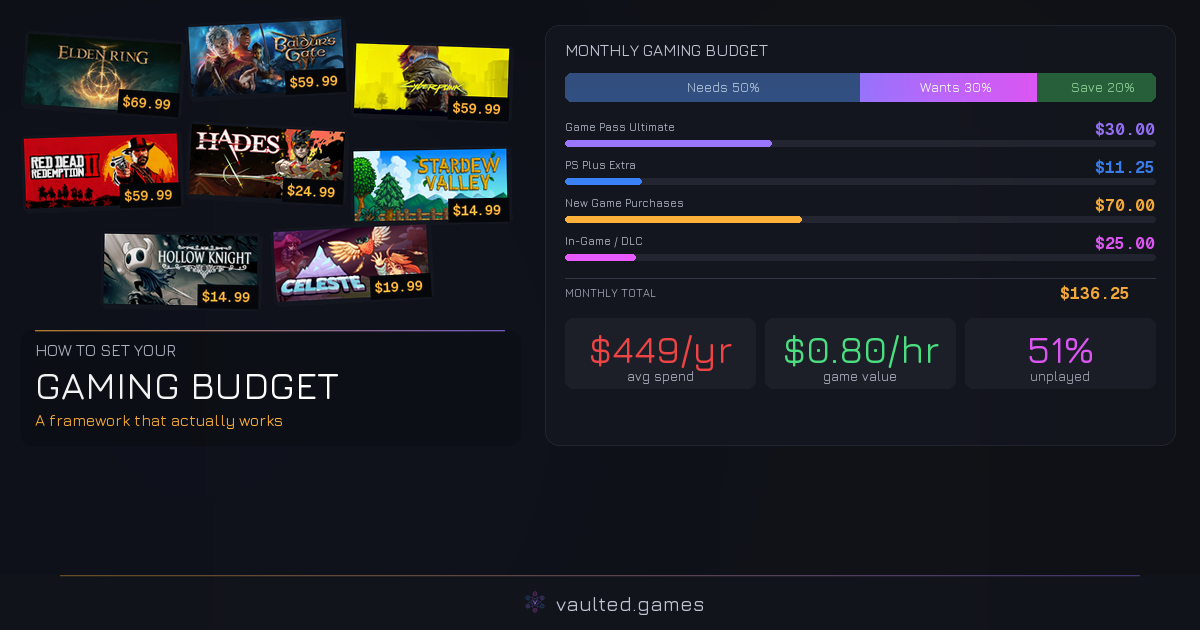
Gaming allocation (15%): $225/month
| Expense | Monthly | Annual |
|---|---|---|
| Game Pass Ultimate | $30 | $360 |
| PS Plus Extra | $11 | $135 |
| New game purchases | $70 | $840 |
| In-game/DLC spending | $25 | $300 |
| Total | $136 | $1,635 |
That leaves about $89 a month of buffer in the gaming allocation. Some months you might spend more (big release month), some months less. The point is you have a framework. You know your ceiling. And $1,635 a year gets you plenty of gaming without the guilt of overspending.
The Bottom Line
64% of gamers say they have less money to spend on games due to cost of living pressures. Prices are going up. Subscriptions are getting more expensive. And the industry is really, really good at getting you to spend money you didn't plan to spend.
A gaming budget isn't about restriction. It's about making sure the money you do spend goes toward games you actually play and enjoy. When a third of purchased games never get launched and $19 billion sits in unplayed Steam libraries alone, the problem isn't that gamers don't spend enough. It's that they spend without a plan.
Pick a framework, set a number, track your spending, and buy with intention. Your wallet and your backlog will both thank you.