The Benefits of Synchronizing Your Gaming Accounts
How many platforms do you game on? Two? Three? If you're like most people, the answer is "more than one and I've lost track of what I own on each."
72% of gamers worldwide play on two or more platforms. 25% are on three (mobile, PC, and console). And 58% are buying games from multiple online stores. That means your game library isn't a library at all. It's a collection of separate shelves that can't see each other.
You've got a Steam library with 200+ games. A PlayStation collection you mostly forget about. Some Xbox Game Pass titles you played once. A handful of Switch games buried in the eShop. And no single place to see what you actually own across all of them.
That's not just annoying. It's actively costing you money and time.
The Fragmentation Problem
Every gaming platform operates as its own walled garden. PlayStation doesn't know what you own on Steam. Xbox doesn't know about your Nintendo purchases. And none of them know about each other's sales, wishlists, or subscription catalogs.
Bain & Company's 2024 gaming distribution report highlighted this as one of the biggest friction points in modern gaming. 58% of gamers are buying from multiple stores, but none of those stores communicate with each other. The result? Your purchasing history, wishlist, and play data are siloed across 3-5 different ecosystems with no unified view.
This creates real problems. Not theoretical ones. Problems you're probably dealing with right now without thinking about it.
You're Probably Buying Games Twice
There's no published industry stat on duplicate purchases across platforms, but spend five minutes in any gaming forum and you'll find thread after thread of people discovering they bought the same game on two platforms without realizing it. Sometimes it's an indie title that's on sale everywhere. Sometimes it's a free-to-play game where you accidentally spent money on two different accounts. Sometimes you just forgot you bought it on PS4 three years ago and grabbed it again on Steam.
When your library is split across 4-5 platforms with no central view, the only way to check "do I already own this?" is to open each platform individually and search. Nobody does that while staring at a $5 deal during a Steam sale. You just buy it. And sometimes, you already had it.
A tool that shows your complete library in one place eliminates this entirely. Before you buy anything, you can see at a glance whether you already own it somewhere else. That's money saved with zero effort.
The Backlog Blindspot
The median Steam user has over 51% of their library unplayed. And that's just Steam. Add in games from PlayStation Plus catalogs you downloaded and forgot, Game Pass titles you installed but never launched, and eShop purchases from 2019, and the real number is almost certainly worse.
The backlog problem isn't just about having too many games. It's about not being able to see your backlog as a whole. When your unplayed games are split across four different platforms, no single platform shows you the full picture. PlayStation says you have 15 unplayed games. Steam says 80. Xbox says 12. The real number is 107, but you've never seen that number because nobody is adding them up for you.
This is why analysis paralysis hits so hard. The average gamer only plays 4-5 games per year despite having access to hundreds through their subscriptions and purchases. You sit down to play something and end up scrolling through one platform's library, then another, then another, and 30 minutes later you're watching YouTube instead.
A unified view of your entire library, sorted by what's unplayed or in progress, turns "I have too many games" into "here's exactly what I haven't played yet, and here's where to start."
Subscription Tracking Gets Messy Fast
The gaming subscription market hit $14.3 billion globally in 2025. PlayStation Plus has 51.2 million subscribers. Xbox Game Pass sits at 35-37 million. Nintendo Switch Online has 32 million. That's over 118 million active gaming subscriptions, and plenty of people hold more than one.
63% of U.S. gamers maintain multiple gaming subscriptions simultaneously, and subscription spending in 2025 is running 19% higher year-over-year. When you're paying for Game Pass Ultimate ($30/month), PS Plus Extra ($11/month), and Nintendo Switch Online ($3/month), you need to know what each service is giving you, otherwise you're just lighting money on fire.
The overlap problem is real. The same game can appear on Game Pass and PS Plus Extra at the same time. If you're not cross-referencing your subscriptions, you might be paying for redundant access without knowing it. And when games leave a subscription service (which happens monthly), you need visibility into which games you're about to lose access to so you can either finish them or buy them.
Syncing your accounts gives you a bird's-eye view of your subscription coverage. What's available where, what overlaps, and what you should prioritize before it disappears.
Smarter Buying Decisions
Cross-platform games are the norm now. 94% of AAA developers implement crossplay features, and 67% of developers are shifting toward cross-platform development. Most major releases come out on PlayStation, Xbox, PC, and often Switch simultaneously.
That means for any given game, you have multiple places to buy it. And the price can vary significantly between platforms. Steam regularly has deeper discounts than console stores. PlayStation runs different sales than Xbox. Epic gives away free games weekly. Humble Bundle offers game collections at steep discounts.
When your accounts are synced and you can see your full library in one place, the buying decision gets clearer. Which platform has the best price? Do I already own it somewhere? Is it on one of my subscriptions already? These questions are easy to answer when you have a unified dashboard. They're a pain in the ass when you have to check four different stores and three different subscription catalogs manually.
Multi-platform players already demonstrate roughly 35% higher lifetime value and return to games 31% more often than single-platform users. The engagement is higher, but only if you can actually manage the complexity that comes with gaming across multiple ecosystems.
Price Tracking Across Every Store
Price tracking is where account synchronization goes from "nice to have" to "saving real money." Instead of checking IsThereAnyDeal, PSPrices, Deku Deals, and SteamDB separately, a synced system can monitor prices across every platform for the games on your wishlist.
The practical value is simple. You want Elden Ring DLC. It's $40 everywhere right now. Instead of checking five stores every week hoping for a sale, you set one alert and get notified when any platform drops the price. The game is the same wherever you buy it. You just want the cheapest option.
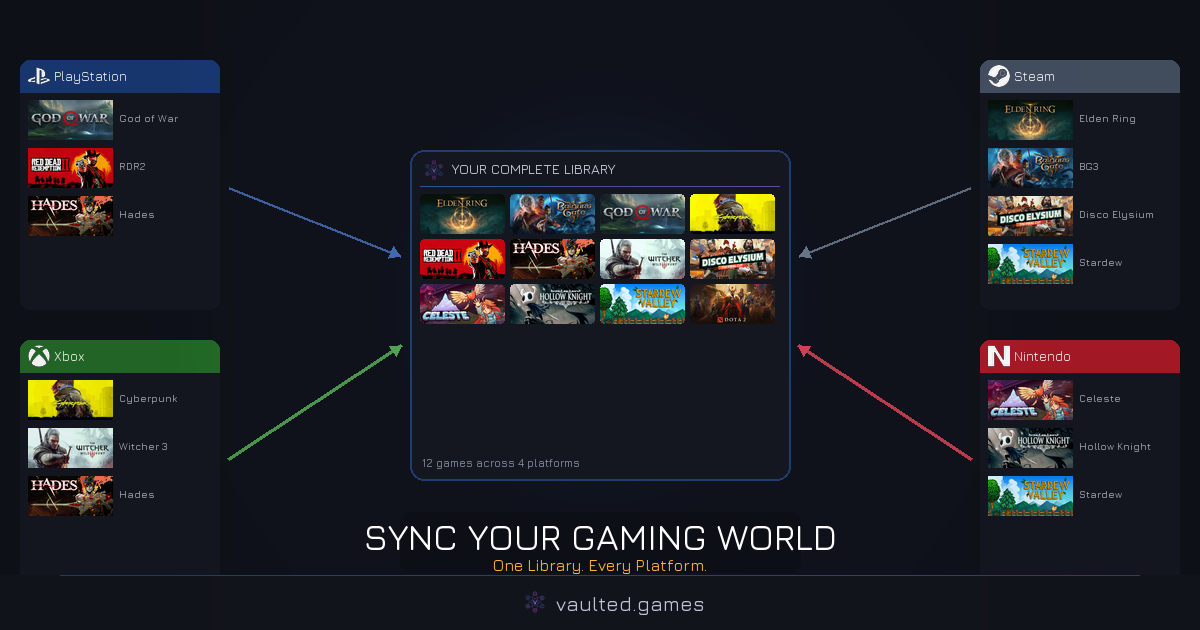
Vaulted.Games does exactly this. Link your PlayStation, Xbox, Steam, and Nintendo accounts, and you get a unified view of everything you own, everything on your wishlist, and price tracking across platforms. When a wishlisted game goes on sale anywhere, you know about it. No more browsing sale pages and impulse buying. No more accidentally re-purchasing games you already own somewhere else.
Your Play History, Complete
Here's something most gamers don't think about but should. Your play history is scattered just like your library. Steam tracks time played. PlayStation tracks trophies. Xbox tracks achievements and play time. Nintendo tracks play activity. But none of them show you a complete picture.
How many hours have you gamed this year, total? Across all platforms? What's your actual most-played game when you combine Steam hours with PlayStation sessions? Are you spreading your time across 20 games and finishing none, or focusing on a few?
These questions are unanswerable when your data lives in separate silos. A synchronized account brings all that play data together, giving you insights into your actual gaming habits. Not your Steam habits or your PlayStation habits. Your gaming habits. And that awareness is the first step to gaming more intentionally, playing what you enjoy and spending on what you'll actually use.
The Time Tax of Fragmentation
Every time you want to check a price, look up a game, manage a wishlist, or review your backlog, you're paying a time tax for being a multi-platform gamer. Open Steam. Check. Open PS app. Check. Open Xbox app. Check. Go to the Nintendo website. Check. Maybe check IsThereAnyDeal. Maybe check Deku Deals.
That's 10-15 minutes for something that should take 30 seconds. Do it a few times a week and you're spending an hour a month on library management across platforms. That's an hour you could be actually playing something.
Account synchronization isn't a luxury feature. For the 72% of gamers on multiple platforms, it's the difference between managing your hobby efficiently and getting nickel-and-dimed by fragmentation you've just accepted as normal.